v0.4.0 · Free for macOS

One shortcut. A screenshot worth sharing.

Capture, polish, and ship beautiful screenshots in under a minute — without leaving your Mac. Free, local, no account required.

Open source BSD-3 licensed 100% on-device Apple Silicon + Intel
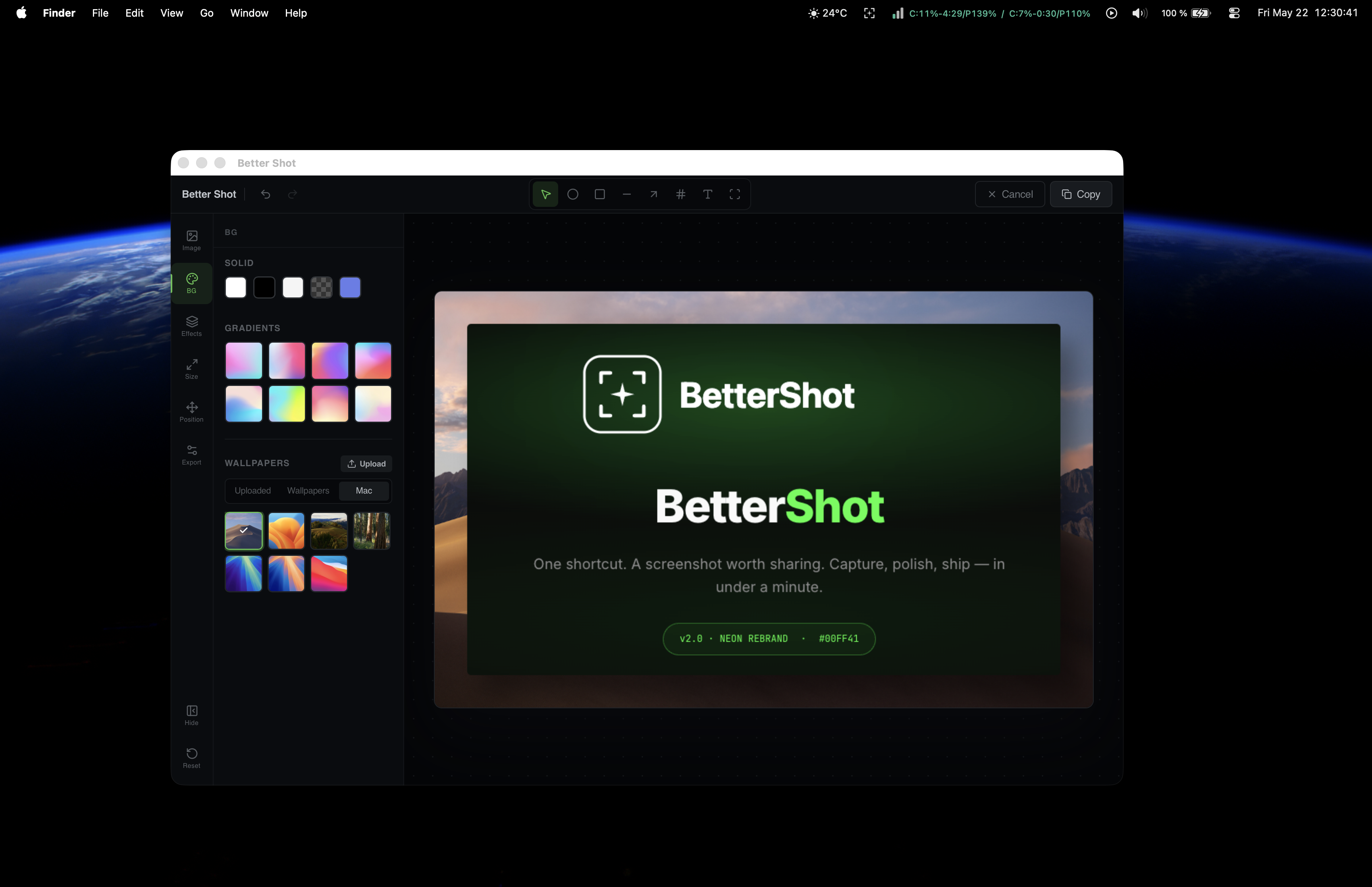
BetterShot editor on macOS — neon-green theme, sidebar with gradient and wallpaper backgrounds, hero image showcasing the new BetterShot logo
2 to capture
Saved to clipboard
§ 01 — The fix

From bug-report screenshots to something you're proud to ship.

You ship screenshots that look like bug reports.

Raw captures. Harsh white edges. A stray desktop icon in the corner. You paste them into Slack, docs, or a tweet — and they undersell the work.

Fixing them means opening Figma, aligning shadows, fighting with gradients. Ten minutes later, you've lost your train of thought.

Press ⌘⇧2. Drag. Done.

BetterShot captures the region and opens the editor instantly. Pick a background, nudge the shadow, drop an arrow where it matters, and hit ⌘S.

The polished version is on your clipboard before you'd even have Figma open.

Backgrounds that don't look templated

Mesh gradients, wallpapers, solid colors, transparency — or drop in your own image.

Annotations where the eye goes first

Arrows, circles, numbered callouts, text labels. Auto-incrementing badges for walkthroughs.

Shadow & depth, dialed in

Tune corner radius, blur, noise, and padding from 0 (edge-to-edge) to 200px.

Keyboard-driven everything

Save, copy, undo, redo, close. Shortcuts work even when BetterShot is hidden.

Edit any image — not just captures

Drag in a PNG, JPG, or existing screenshot and polish it the same way.

Stays on your machine

No account. No uploads. No telemetry. Screenshots never leave your Mac.

§ 02 — The flow

Four steps. Thirty seconds.

Press the shortcut

From anywhere — even with BetterShot hidden in the menu bar.

2

Drag the region

The editor opens the moment you release. No extra clicks.

Polish it

Background, shadow, padding, arrows, numbered callouts, text.

Ship it

Save to disk, or drop it straight onto your clipboard.

⌘S⇧⌘C

Everything stays on your Mac.

No uploads. No account. No telemetry. Your screenshots — and whatever sensitive thing happens to be in them — never leave the device.

§ 03 — Install

Ready in thirty seconds.

Signed by Apple, notarized, and free. Pick the build that matches your Mac — macOS 10.15 or later.

Apple Silicon
Download for M1 – M5
bettershot_0.4.0_aarch64.dmg · ~41 MB
Intel
Download for Intel Macs
bettershot_0.4.0_x64.dmg · ~42 MB
Not sure which? On your Mac, click the Apple menu → About This Mac. If the chip starts with "Apple" (M1/M2/M3/M4/M5), pick Apple Silicon. Otherwise, Intel.
§ 04 — What's new

Every release, plain English.

v0.4.0 June 16, 2026 Latest
Added
  • Batch resize for multiple photos — select several images and resize them all at once.
  • Platform-size indicators — visual badges showing Apple Silicon vs Intel build compatibility.
  • Original and resized preview per image — side-by-side comparison in the batch panel.
  • Capture history store — persistent recording of recent captures with a gallery view.
  • Multi-select gallery — select multiple captures and send them to Batch Resize.
  • Rolling raw-capture buffer — automatic history management without manual cleanup.
  • Slideshow view — browse batch resize previews in full-screen mode.
Documentation
  • README rewritten with AIDA structure for better onboarding.
  • Landing page redesigned — split hero, dominant screenshot, logo sync.
  • Changelog timeline added to the landing page.
v0.3.0 May 22, 2026
Added
  • Persistent custom background images — upload your own images from the editor's background panel; they stick around between sessions.
  • Neon-green brand identity — refreshed logo, app accent, Tauri app icons, and landing page around a new bracket-and-spark mark.
  • Menu-bar template icon — auto-tints to match macOS appearance (white on dark, black on light) instead of a tiny colour glyph.
Changed
  • Upload flow streamlined — removed the permission-grant dialog; the Upload button now opens the file picker directly.
  • App accent dialled back — softer green in the editor for long sessions; brand assets keep the bright neon for marketing.
v0.2.8 Apr 18, 2026
Added
  • Signed & notarized builds — Apple Silicon and Intel DMGs are Developer ID signed, hardened-runtime, and notarized by Apple. No more "unidentified developer" warning on first launch.
  • New brand identity — refreshed BetterShot logo across the app, Dock icon, README, and a new standalone landing page.
v0.2.7 Apr 10, 2026
Added
  • Device frames for screenshots — wrap captures in iPhone or MacBook frames for polished presentations.
  • Global shortcut — press ⌘⇧B from anywhere to bring BetterShot to the foreground.
Fixed
  • MacBook frame proportions reworked to a full laptop silhouette.
  • iPhone frame layout corrected to wrap the screenshot properly.
View full changelog on GitHub
§ 05 — Questions

Things people ask first.

Is it really free?

Yes. BSD-3 licensed, fully open source, no paid tier. Star the repo on GitHub if it saves you time — that's all we ask.

Does it work on Intel Macs?

Yes. Separate builds ship for Apple Silicon (M1 through M5) and Intel. Both are on the Releases page.

Will it upload my screenshots anywhere?

Never. BetterShot runs entirely on your Mac. No network calls, no account, no cloud sync, no telemetry.

What about Windows or Linux?

macOS 10.15 or later only, for now. A cross-platform version isn't on the roadmap — the app leans on macOS-native capture APIs.

Can I edit images I didn't capture?

Yes. Drag any PNG or JPG into the editor and apply the same backgrounds, shadows, and annotations.

What permissions does it need?

Only Screen Recording, which macOS requires for any screenshot tool. Grant it in System Settings → Privacy & Security → Screen Recording on first launch.

Stop shipping raw screenshots.

Free forever. Installs in thirty seconds via Homebrew. Works the moment you press the shortcut.