

Slash Commands
Overview
Slash commands are shortcuts that control Claude's behavior during an interactive session. They come in several types:
- Built-in commands: Provided by Claude Code (
/help,/clear,/model) - Skills: User-defined commands created as
SKILL.mdfiles (/optimize,/pr) - Plugin commands: Commands from installed plugins (
/frontend-design:frontend-design) - MCP prompts: Commands from MCP servers (
/mcp__github__list_prs)
Note: Custom slash commands have been merged into skills. Files in
.claude/commands/still work, but skills (.claude/skills/) are now the recommended approach. Both create/command-nameshortcuts. See the Skills Guide for the full reference.
Built-in Commands Reference
Built-in commands are shortcuts for common actions. There are 60+ built-in commands and 5 bundled skills available. Type / in Claude Code to see the full list, or type / followed by any letters to filter.
| Command | Purpose |
|---|---|
/add-dir <path> |
Add working directory |
/agents |
Manage agent configurations |
/branch [name] |
Branch conversation into a new session (alias: /fork). Note: /fork renamed to /branch in v2.1.77 |
/btw <question> |
Ask an ephemeral side question while Claude is working on the main task; doesn't pollute the main conversation context |
/chrome |
Configure Chrome browser integration |
/clear |
Clear conversation (aliases: /reset, /new) |
/color [color\|default] |
Set prompt bar color. Bare /color (no args) picks a random session color (v2.1.128+); pass a color name or hex to set explicitly. |
/compact [instructions] |
Compact conversation with optional focus instructions |
/config |
Open Settings (alias: /settings) |
/context |
Visualize context usage as colored grid |
/copy [N] |
Copy assistant response to clipboard; w writes to file |
/cost |
Typing-shortcut alias for /usage — opens the cost tab (v2.1.118+) |
/desktop |
Continue in Desktop app (alias: /app) |
/diff |
Interactive diff viewer for uncommitted changes |
/doctor |
Diagnose installation health — openable while Claude is responding; shows status icons; press f to auto-fix issues (enhanced in v2.1.116) |
/effort [low\|medium\|high\|xhigh\|max\|auto] |
Set effort level via interactive arrow-key slider. Levels: low → medium → high → xhigh (new in v2.1.111) → max. Default is xhigh on Opus 4.7; max requires Opus 4.7 |
/exit |
Exit the REPL (alias: /quit) |
/export [filename] |
Export the current conversation to a file or clipboard |
/extra-usage |
Configure extra usage for rate limits |
/fast [on\|off] |
Toggle fast mode |
/feedback |
Submit feedback (alias: /bug) |
/focus |
Toggle focus view (added v2.1.110; replaces Ctrl+O for focus toggle) |
/help |
Show help |
/hooks |
View hook configurations |
/ide |
Manage IDE integrations |
/init |
Initialize CLAUDE.md. Set CLAUDE_CODE_NEW_INIT=1 for interactive flow |
/insights |
Generate session analysis report |
/install-github-app |
Set up GitHub Actions app |
/install-slack-app |
Install Slack app |
/keybindings |
Open keybindings configuration |
/less-permission-prompts |
Analyze recent Bash/MCP tool calls and add a prioritized allowlist to .claude/settings.json to reduce permission prompts (added v2.1.111) |
/login |
Switch Anthropic accounts |
/logout |
Sign out from your Anthropic account |
/mcp |
Manage MCP servers and OAuth |
/memory |
Edit CLAUDE.md, toggle auto-memory |
/mobile |
QR code for mobile app (aliases: /ios, /android) |
/model [model] |
Select model with left/right arrows for effort |
/passes |
Share free week of Claude Code |
/permissions |
View/update permissions (alias: /allowed-tools) |
/plan [description] |
Enter plan mode |
/plugin |
Manage plugins |
/proactive |
Alias for /loop (added v2.1.105) |
/powerup |
Discover features through interactive lessons with animated demos |
/privacy-settings |
Privacy settings (Pro/Max only) |
/release-notes |
View changelog |
/recap |
Show session recap / summary when returning to a session (added v2.1.108) |
/reload-plugins |
Reload active plugins |
/remote-control |
Remote control from claude.ai (alias: /rc) |
/remote-env |
Configure default remote environment |
/rename [name] |
Rename session |
/resume [session] |
Resume conversation (alias: /continue) |
/review |
Deprecated — install the code-review plugin instead |
/rewind |
Rewind conversation and/or code (alias: /checkpoint) |
/sandbox |
Toggle sandbox mode |
/schedule [description] |
Create/manage Cloud scheduled tasks |
/security-review |
Analyze branch for security vulnerabilities |
/skills |
List available skills |
/stats |
Typing-shortcut alias for /usage — opens the stats tab (daily usage, sessions, streaks) (v2.1.118+) |
/stickers |
Order Claude Code stickers |
/status |
Show version, model, account |
/statusline |
Configure status line |
/tasks |
List/manage background tasks |
/team-onboarding |
Generate a teammate ramp-up guide from the project's Claude Code setup (new in v2.1.101) |
/terminal-setup |
Configure terminal keybindings |
/theme |
Open theme picker / manage custom themes (v2.1.118). Define custom themes via JSON in ~/.claude/themes/<name>.json |
/tui |
Toggle fullscreen TUI (text user interface) mode with flicker-free rendering (added v2.1.110) |
/ultraplan <prompt> |
Draft plan in ultraplan session, review in browser |
/ultrareview |
Comprehensive cloud-based code review with multi-agent analysis (added v2.1.111) |
/undo |
Alias for /rewind (added v2.1.108) |
/upgrade |
Open upgrade page for higher plan tier |
/usage |
Canonical usage dashboard (v2.1.118) — combines plan usage limits, rate limits, cost, and daily session stats. /cost and /stats are typing-shortcut aliases that open specific tabs |
/voice |
Toggle push-to-talk voice dictation |
Bundled Skills
These skills ship with Claude Code and are invoked like slash commands:
| Skill | Purpose |
|---|---|
/batch <instruction> |
Orchestrate large-scale parallel changes using worktrees |
/claude-api |
Load Claude API reference for project language |
/debug [description] |
Enable debug logging |
/loop [interval] <prompt> |
Run prompt repeatedly on interval |
/simplify [focus] |
Review changed files for code quality |
Deprecated Commands
| Command | Status |
|---|---|
/review |
Deprecated — replaced by code-review plugin |
/output-style |
Deprecated since v2.1.73 |
/fork |
Renamed to /branch (alias still works, v2.1.77) |
/pr-comments |
Removed in v2.1.91 — ask Claude directly to view PR comments |
/vim |
Removed in v2.1.92 — use /config → Editor mode |
Recent Changes
/forkrenamed to/branchwith/forkkept as alias (v2.1.77)/output-styledeprecated (v2.1.73)/reviewdeprecated in favor of thecode-reviewplugin/effortcommand added withmaxlevel requiring Opus 4.7 (originally Opus 4.6-only)/voicecommand added for push-to-talk voice dictation/schedulecommand added for creating/managing scheduled tasks/colorcommand added for prompt bar customization- /pr-comments removed in v2.1.91 — ask Claude directly to view PR comments
- /vim removed in v2.1.92 — use /config → Editor mode instead
- /ultraplan added for browser-based plan review and execution
- /powerup added for interactive feature lessons
- /sandbox added for toggling sandbox mode
/modelpicker now shows human-readable labels (e.g., "Sonnet 4.6") instead of raw model IDs/resumesupports/continuealias- MCP prompts are available as
/mcp__<server>__<prompt>commands (see MCP Prompts as Commands) /team-onboardingadded for auto-generating teammate ramp-up guides (v2.1.101)/tuicommand added for flicker-free fullscreen TUI rendering (v2.1.110)/focuscommand added for focus view toggle;Ctrl+Onow only toggles verbose transcript (v2.1.110)/recapcommand added to manually trigger session context recap (v2.1.108)/undoadded as alias for/rewind(v2.1.108)/proactiveadded as alias for/loop(v2.1.105)/effortgained interactive arrow-key slider and newxhighlevel betweenhighandmax; default effort raised toxhighfor Opus 4.7 plans (v2.1.111)/ultrareviewadded for comprehensive cloud-based multi-agent code review (v2.1.111)/less-permission-promptsadded to analyze Bash/MCP tool calls and reduce permission prompts via an allowlist in.claude/settings.json(v2.1.111)- Auto mode no longer requires the
--enable-auto-modeflag for Max subscribers on Opus 4.7 (v2.1.112)
/team-onboarding — Teammate Ramp-Up Guide
New in v2.1.101
Use /team-onboarding to generate a teammate ramp-up guide from your project's local Claude Code usage. The command inspects your CLAUDE.md, installed skills, subagents, hooks, and recent workflows, then produces an onboarding document that helps new developers become productive quickly.
It's a built-in command — nothing to install.
Usage:
claude /team-onboarding
The generated guide summarizes:
- Project purpose and key conventions from
CLAUDE.md - Available skills and when they are auto-invoked
- Configured subagents and their responsibilities
- Hooks that run on common events
- Common workflows newcomers should know about
Availability: Shipped in Claude Code v2.1.101 (April 11, 2026).
Custom Commands (Now Skills)
Custom slash commands have been merged into skills. Both approaches create commands you can invoke with /command-name:
| Approach | Location | Status |
|---|---|---|
| Skills (Recommended) | .claude/skills/<name>/SKILL.md |
Current standard |
| Legacy Commands | .claude/commands/<name>.md |
Still works |
If a skill and a command share the same name, the skill takes precedence. For example, when both .claude/commands/review.md and .claude/skills/review/SKILL.md exist, the skill version is used.
Migration Path
Your existing .claude/commands/ files continue to work without changes. To migrate to skills:
Before (Command):
.claude/commands/optimize.md
After (Skill):
.claude/skills/optimize/SKILL.md
Why Skills?
Skills offer additional features over legacy commands:
- Directory structure: Bundle scripts, templates, and reference files
- Auto-invocation: Claude can trigger skills automatically when relevant
- Invocation control: Choose whether users, Claude, or both can invoke
- Subagent execution: Run skills in isolated contexts with
context: fork - Progressive disclosure: Load additional files only when needed
Creating a Custom Command as a Skill
Create a directory with a SKILL.md file:
mkdir -p .claude/skills/my-command
File: .claude/skills/my-command/SKILL.md
---
name: my-command
description: What this command does and when to use it
---

# My Command

Instructions for Claude to follow when this command is invoked.

1. First step
2. Second step
3. Third step
Frontmatter Reference
| Field | Purpose | Default |
|---|---|---|
name |
Command name (becomes /name) |
Directory name |
description |
Brief description (helps Claude know when to use it) | First paragraph |
argument-hint |
Expected arguments for auto-completion | None |
allowed-tools |
Tools the command can use without permission | Inherits |
model |
Specific model to use | Inherits |
disable-model-invocation |
If true, only user can invoke (not Claude) |
false |
user-invocable |
If false, hide from / menu |
true |
context |
Set to fork to run in isolated subagent |
None |
agent |
Agent type when using context: fork |
general-purpose |
hooks |
Skill-scoped hooks (PreToolUse, PostToolUse, Stop) | None |
Arguments
Commands can receive arguments:
All arguments with $ARGUMENTS:
---
name: fix-issue
description: Fix a GitHub issue by number
---

Fix issue #$ARGUMENTS following our coding standards
Usage: /fix-issue 123 → $ARGUMENTS becomes "123"
Individual arguments with $0, $1, etc.:
---
name: review-pr
description: Review a PR with priority
---

Review PR #$0 with priority $1
Usage: /review-pr 456 high → $0="456", $1="high"
Dynamic Context with Shell Commands
Execute bash commands before the prompt using !`command`:
---
name: commit
description: Create a git commit with context
allowed-tools: Bash(git *)
---

## Context

- Current git status: !`git status`
- Current git diff: !`git diff HEAD`
- Current branch: !`git branch --show-current`
- Recent commits: !`git log --oneline -5`

## Your task

Based on the above changes, create a single git commit.
File References
Include file contents using @:
Review the implementation in @src/utils/helpers.js
Compare @src/old-version.js with @src/new-version.js
Plugin Commands
Plugins can provide custom commands:
/plugin-name:command-name
Or simply /command-name when there are no naming conflicts.
Examples:
/frontend-design:frontend-design
/commit-commands:commit
MCP Prompts as Commands
MCP servers can expose prompts as slash commands:
/mcp__<server-name>__<prompt-name> [arguments]
Examples:
/mcp__github__list_prs
/mcp__github__pr_review 456
/mcp__jira__create_issue "Bug title" high
MCP Permission Syntax
Control MCP server access in permissions:
mcp__github- Access entire GitHub MCP servermcp__github__*- Wildcard access to all toolsmcp__github__get_issue- Specific tool access
Command Architecture
graph TD
    A["User Input: /command-name"] --> B{"Command Type?"}
    B -->|Built-in| C["Execute Built-in"]
    B -->|Skill| D["Load SKILL.md"]
    B -->|Plugin| E["Load Plugin Command"]
    B -->|MCP| F["Execute MCP Prompt"]

    D --> G["Parse Frontmatter"]
    G --> H["Substitute Variables"]
    H --> I["Execute Shell Commands"]
    I --> J["Send to Claude"]
    J --> K["Return Results"]
Command Lifecycle
sequenceDiagram
    participant User
    participant Claude as Claude Code
    participant FS as File System
    participant CLI as Shell/Bash

    User->>Claude: Types /optimize
    Claude->>FS: Searches .claude/skills/ and .claude/commands/
    FS-->>Claude: Returns optimize/SKILL.md
    Claude->>Claude: Parses frontmatter
    Claude->>CLI: Executes !`command` substitutions
    CLI-->>Claude: Command outputs
    Claude->>Claude: Substitutes $ARGUMENTS
    Claude->>User: Processes prompt
    Claude->>User: Returns results
Available Commands in This Folder
These example commands can be installed as skills or legacy commands.
1. /optimize - Code Optimization
Analyzes code for performance issues, memory leaks, and optimization opportunities.
Usage:
/optimize
[Paste your code]
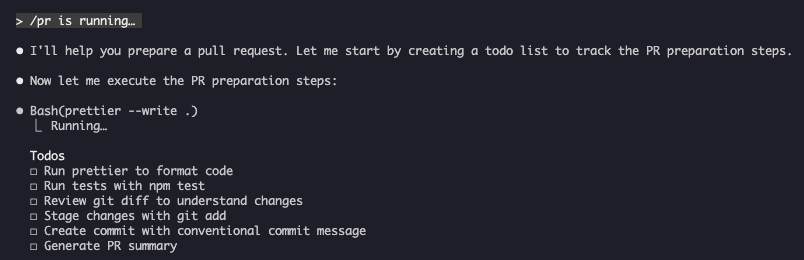
2. /pr - Pull Request Preparation
Guides through PR preparation checklist including linting, testing, and commit formatting.
Usage:
/pr
Screenshot:
3. /generate-api-docs - API Documentation Generator
Generates comprehensive API documentation from source code.
Usage:
/generate-api-docs
4. /commit - Git Commit with Context
Creates a git commit with dynamic context from your repository.
Usage:
/commit [optional message]
5. /push-all - Stage, Commit, and Push
Stages all changes, creates a commit, and pushes to remote with safety checks.
Usage:
/push-all
Safety Checks:
- Secrets: .env*, *.key, *.pem, credentials.json
- API Keys: Detects real keys vs. placeholders
- Large files: >10MB without Git LFS
- Build artifacts: node_modules/, dist/, __pycache__/
6. /doc-refactor - Documentation Restructuring
Restructures project documentation for clarity and accessibility.
Usage:
/doc-refactor
7. /setup-ci-cd - CI/CD Pipeline Setup
Implements pre-commit hooks and GitHub Actions for quality assurance.
Usage:
/setup-ci-cd
8. /unit-test-expand - Test Coverage Expansion
Increases test coverage by targeting untested branches and edge cases.
Usage:
/unit-test-expand
Installation
As Skills (Recommended)
Copy to your skills directory:
# Create skills directory
mkdir -p .claude/skills

# For each command file, create a skill directory
for cmd in optimize pr commit; do
  mkdir -p .claude/skills/$cmd
  cp 01-slash-commands/$cmd.md .claude/skills/$cmd/SKILL.md
done
As Legacy Commands
Copy to your commands directory:
# Project-wide (team)
mkdir -p .claude/commands
cp 01-slash-commands/*.md .claude/commands/

# Personal use
mkdir -p ~/.claude/commands
cp 01-slash-commands/*.md ~/.claude/commands/
Creating Your Own Commands
Skill Template (Recommended)
Create .claude/skills/my-command/SKILL.md:
---
name: my-command
description: What this command does. Use when [trigger conditions].
argument-hint: [optional-args]
allowed-tools: Bash(npm *), Read, Grep
---

# Command Title

## Context

- Current branch: !`git branch --show-current`
- Related files: @package.json

## Instructions

1. First step
2. Second step with argument: $ARGUMENTS
3. Third step

## Output Format

- How to format the response
- What to include
User-Only Command (No Auto-Invocation)
For commands with side effects that Claude shouldn't trigger automatically:
---
name: deploy
description: Deploy to production
disable-model-invocation: true
allowed-tools: Bash(npm *), Bash(git *)
---

Deploy the application to production:

1. Run tests
2. Build application
3. Push to deployment target
4. Verify deployment
Best Practices
| Do | Don't |
|---|---|
| Use clear, action-oriented names | Create commands for one-time tasks |
Include description with trigger conditions |
Build complex logic in commands |
| Keep commands focused on single task | Hardcode sensitive information |
Use disable-model-invocation for side effects |
Skip the description field |
Use ! prefix for dynamic context |
Assume Claude knows current state |
| Organize related files in skill directories | Put everything in one file |
Troubleshooting
Command Not Found
Solutions:
- Check file is in .claude/skills/<name>/SKILL.md or .claude/commands/<name>.md
- Verify the name field in frontmatter matches expected command name
- Restart Claude Code session
- Run /help to see available commands
Command Not Executing as Expected
Solutions:
- Add more specific instructions
- Include examples in the skill file
- Check allowed-tools if using bash commands
- Test with simple inputs first
Skill vs Command Conflict
If both exist with the same name, the skill takes precedence. Remove one or rename it.
Related Guides
- Skills - Full reference for skills (auto-invoked capabilities)
- Memory - Persistent context with CLAUDE.md
- Subagents - Delegated AI agents
- Plugins - Bundled command collections
- Hooks - Event-driven automation
Additional Resources
- Official Interactive Mode Documentation - Built-in commands reference
- Official Skills Documentation - Complete skills reference
- CLI Reference - Command-line options
Last Updated: May 9, 2026 Claude Code Version: 2.1.138 Sources: - https://code.claude.com/docs/en/slash-commands - https://code.claude.com/docs/en/interactive-mode - https://code.claude.com/docs/en/changelog - https://github.com/anthropics/claude-code/releases/tag/v2.1.118 - https://github.com/anthropics/claude-code/releases/tag/v2.1.116 Compatible Models: Claude Sonnet 4.6, Claude Opus 4.7, Claude Haiku 4.5
Part of the Claude How To guide series